 aigenerator
Make a 15-second product ad with three AI shots
A useful product ad makes one promise visible. For this exercise, make a 15-second vertical perfume ad from three separately generated shots. The deliverable is an edited MP4, not a single prompt that promises an entire campaign. You will add the price, logo and call to action in your editor so they remain readable.
A useful product ad makes one promise visible. For this exercise, make a 15-second vertical perfume ad from three separately generated shots. The deliverable is an edited MP4, not a single prompt that promises an entire campaign. You will add the price, logo and call to action in your editor so they remain readable.
1. Prepare one product and one message
Photograph a bottle you own or have permission to use. Choose a sharp, uncluttered front or three-quarter view, with the full bottle and cap inside the frame. Keep a second close-up for checking the label after generation. Write one sentence about the intended mood: “A quiet evening fragrance, shown through warm light and reflections.” Avoid invented claims about ingredients, longevity or sales results.
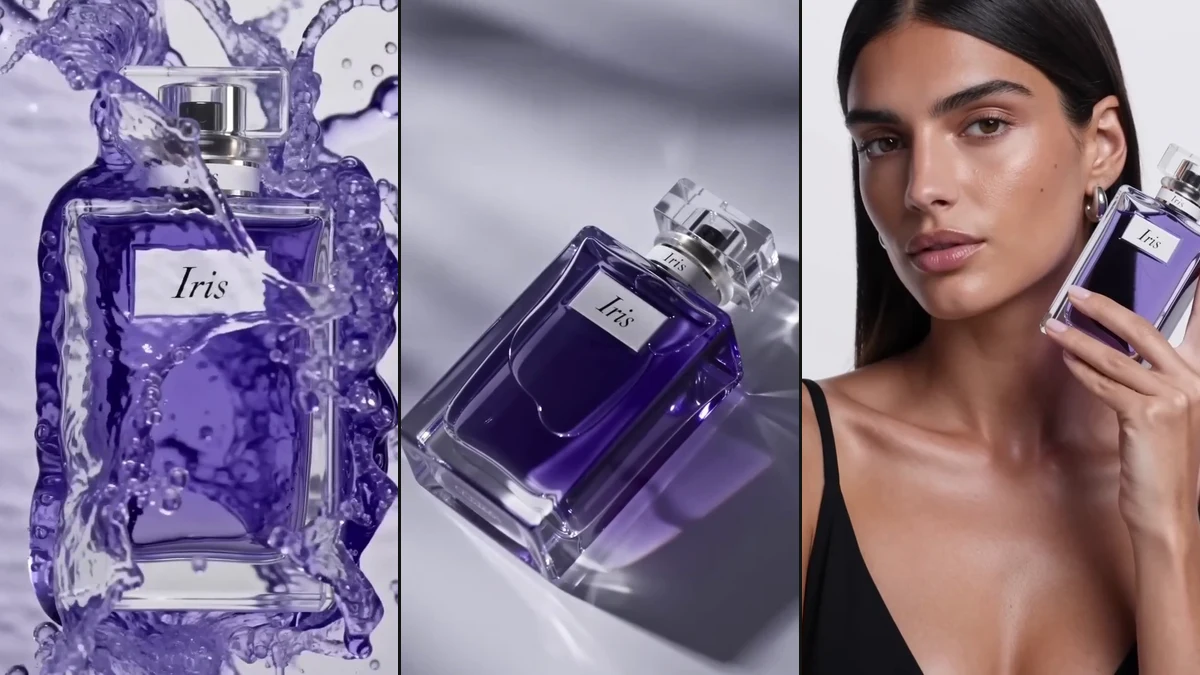
Visual reference: frames from Seedance’s official perfume demo. This is a composition reference, not a result from the exercise.
2. Plan the edit before generating
| Final edit | Shot | Movement | Job |
|---|---|---|---|
| 0–3 seconds | Reflections reveal the bottle | Slow push-in | Hook |
| 3–9 seconds | Clear three-quarter product view | Small camera arc | Show the product |
| 9–15 seconds | Bottle beside a soft shadow | Locked camera | Leave room for a title |
These are edit positions, not model duration settings. Generate clips at the durations supported by your selected model, then trim them. Make the middle product shot first: if the bottle cannot remain recognizable, fix the reference before spending credits on the other shots.
3. Generate a controlled product shot
Open the advertising workspace. Upload the reference, choose an available image-to-video model, and select 9:16 where supported. Some models take their output framing from the image; crop the reference vertically first. Start with the shortest useful supported duration and review the displayed credit cost.
The perfume bottle in the reference image stands on a warm stone plinth. Keep its glass shape, cap and label placement consistent. The camera makes a small, slow arc from left to right. Soft amber side light passes through the glass. Quiet premium product-film mood, clean background, one continuous shot.
Use one action and one camera move. Do not ask the model to invent a slogan inside the image. Reference consistency is an instruction, not a guarantee: inspect the output frame by frame.
4. Build the opening and ending
For the opening, keep the bottle stationary and animate the light rather than adding splashes that might obscure it. For the ending, request a locked shot with empty space above the cap. Reuse the same reference and lighting description; change only the camera instruction. Download usable clips and name them ad_01_hook, ad_02_product and ad_03_end.
In CapCut, DaVinci Resolve or another editor, assemble the timeline, add a licensed soundtrack, and place a short title on the end shot. Keep important text away from interface overlays on the destination platform. Review on a phone before exporting.
5. Fix the specific failure
| Problem | First correction |
|---|---|
| Label becomes unreadable | Reduce camera movement; replace critical text with a clean graphic in the edit |
| Bottle changes shape | Use a clearer reference and remove transformations from the prompt |
| Shot feels static | Animate a reflection or shadow before asking for a bigger camera move |
| Hook takes too long | Trim closer to the first readable product frame |
Budget for accepted footage, not only attempts. Record each job’s quoted credits and whether the clip was usable. A second generation is a separate paid attempt; do not assume it is free because the first result was unattractive.
Before publishing
Check product accuracy, music rights, readable captions and the final frame. Confirm there are no unsupported marketing claims. Download the finished edit or use an available connected publishing account after reviewing the video. Platform acceptance and advertising performance depend on more than generation quality.
Sources & verification
- Seedance 2.0 — official demos ↗ · checked 2026-11-05
- MiniMax — text-to-video API documentation ↗ · checked 2026-11-05
- Volcengine — video generation API documentation ↗ · checked 2026-11-05
Product details can change. Source verification is separate from hands-on testing.