 aigenerator
Direct a 25-second AI short drama in three shots
A convincing short drama needs a legible emotional change. This exercise makes a 25-second conversation in three shots: one person admits a mistake, the other reacts, and both remain in the same space. Generate visual performances first and add recorded dialogue or subtitles during editing.
A convincing short drama needs a legible emotional change. This exercise makes a 25-second conversation in three shots: one person admits a mistake, the other reacts, and both remain in the same space. Generate visual performances first and add recorded dialogue or subtitles during editing.
1. Write a playable moment
Keep the script small enough to show through posture and expression. Example: an adult returns a borrowed letter and admits reading it. The other person pauses before taking it. Avoid opening with a car chase, a new location and a reveal that requires several new characters.
Write a continuity card: two adults, their clothing, the bench’s position, sunset direction and which hand holds the envelope. Prepare separate, rights-cleared reference images if available. Character consistency requires inspection; a repeated description alone cannot guarantee it.
2. Decide where each shot belongs
| Edit position | Camera | Performance cue |
|---|---|---|
| 0–7 seconds | Medium two-shot | Person A extends the envelope |
| 7–16 seconds | Close reaction of B | B notices it, pauses, then looks up |
| 16–25 seconds | Return to the two-shot | B accepts it; neither leaves |
Keep the camera on the same side of the line between the characters. That preserves screen direction: a person looking right in one shot should not inexplicably look the other way in the reverse angle. Generate only the durations offered by the selected model and trim to these edit positions later.
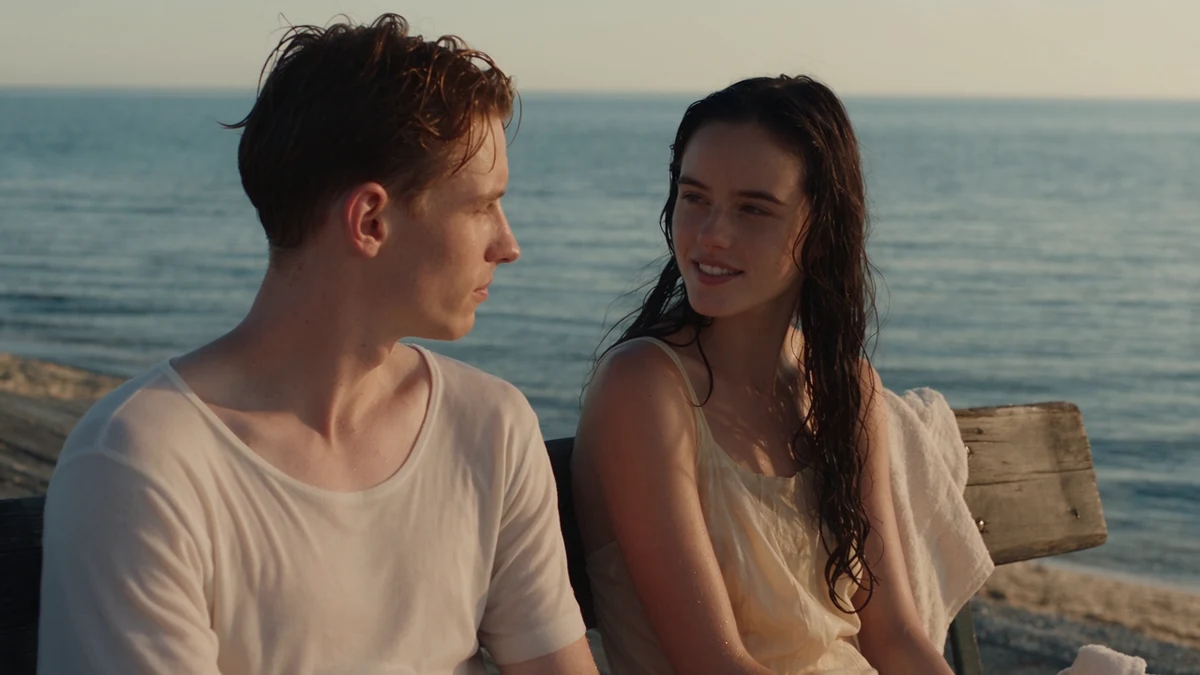
Composition reference from an official Seedance drama demo. The exercise is a new story, not a recreation of a claimed customer result.
3. Generate the emotional reaction
Open the short-drama workspace. Start with the reaction shot because the scene depends on it. Use image-to-video if you have an appropriate reference and keep the camera still or moving very slowly.
An adult woman in a light linen shirt sits on a seaside bench at sunset. She looks down at a sealed envelope offered from the left edge of frame, pauses, then looks toward the person beside her. Her expression changes from guarded to quietly surprised. Medium close-up, warm side light, restrained acting, one continuous shot.
Describe observable actions rather than “make her feel complex regret.” If you need the opposite role or a different wardrobe, change the continuity card and every affected prompt before generating again.
4. Add speech in the edit
Record dialogue with consistent microphone distance, or use speech you have permission to use. Place the voices over the visual shots and use room tone beneath cuts. Reaction shots and over-the-shoulder framing can reduce dependence on a precisely visible speaking mouth. The workspace does not provide a dialogue editor or automatic lip-sync pass.
Add subtitles after the timing is settled. Read them at normal speed and check that a line does not disappear before a viewer can finish it. Keep each speaker’s wording consistent with the emotional beat shown on screen.
5. Diagnose the continuity error
| Problem | Correction |
|---|---|
| Envelope changes hands | Limit the shot to receiving or offering, not both actions |
| Clothing changes | Reuse a sharper reference and the same clothing description |
| Reaction feels exaggerated | Request a smaller visible action and remove dramatic adjectives |
| Background moves between shots | Simplify the location and use tighter framing |
End on the reaction, not an explanatory title card. Check facial details, hands, screen direction and subtitle timing. Export a short test file and watch it away from the editing timeline; missing story information is easier to notice there. Keep alternate takes named by character and shot, so a replacement does not disturb the rest of the scene.
Fuentes y verificación
- Seedance 2.5 — official demos ↗ · comprobado 2026-11-05
- MiniMax — text-to-video API documentation ↗ · comprobado 2026-11-05
- Volcengine — video generation API documentation ↗ · comprobado 2026-11-05
Los detalles pueden cambiar. Verificar fuentes es distinto de probar el producto.